
Data Source Folders: Difference between revisions
Chris.Hansen (talk | contribs) (Created page with "Data sources can be organized into folders for better accessibility. By default, no folders are used. center|frameless|900x900px == Selecting folders for an existing Data Source == Use the "Folders" field on a data source to select which folder(s) in which it should be organized. # Click the "Edit" button for the Data Source # Enter the folder names in the "Folders" field. You may enter multiple using the Enter or...") |
(No difference)
|
Revision as of 16:41, 31 January 2024
Data sources can be organized into folders for better accessibility. By default, no folders are used.

Selecting folders for an existing Data Source
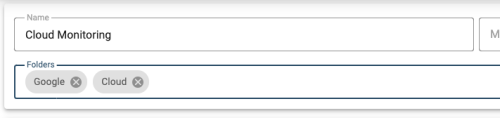
Use the "Folders" field on a data source to select which folder(s) in which it should be organized.
- Click the "Edit" button for the Data Source
- Enter the folder names in the "Folders" field. You may enter multiple using the Enter or Return key. There is also a list of all existing folders to assist in adding adding the folder names.
- Save the Data Source
Selecting folders for a new Data Source
Use the "Folders" field to select which folder(s) in which a new data source should be organized.
- Enter the folder names in the "Folders" field. You may enter multiple using the Enter or Return key. There is also a list of all existing folders to assist in adding adding the folder names.
